
In today’s world of remote work and virtual collaboration, video conferencing is no longer optional; it’s essential. But with so many platforms out there, how do you choose the right one? Microsoft Teams or Zoom, which is truly the best fit for your team’s needs? Or is there an even better alternative waiting to boost your collaboration? Keep reading for a detailed comparison to help you decide with confidence.
Key takeaways
- Compare features, pricing, and plans of Microsoft Teams and Zoom to find the best value.
- Consider user experience, video/audio quality & collaboration capabilities when selecting a platform.
- Understand market share & popularity for insight into their respective positions in the dynamic field of video conferencing.
Microsoft Teams and Zoom: an overview

Microsoft Teams and Zoom are both popular platforms with team video conferencing capabilities, offering a range of features for businesses and individuals, including:
- Screen sharing
- File sharing
- Chat functionality
- Meeting recordings
Both platforms serve millions of businesses worldwide, making them top choices for organizations seeking reliable communication solutions. They enable remote teams to hold virtual face-to-face meetings, collaborate seamlessly, and stay connected across work, education, and social settings.
While Microsoft Teams offers a comprehensive communication hub, combining chat, voice calls, video meetings, Office 365 integration, and file sharing, Zoom is celebrated for its intuitive interface and robust cloud-based infrastructure. Each platform has its strengths and limitations, making it essential to compare them based on key factors such as:
- Pricing
- User experience
- Video and audio quality
- Collaboration features
- Integration capabilities
- Security
Understanding these differences is especially important given their significant positions in the global videoconferencing software market.
What is Microsoft Teams?
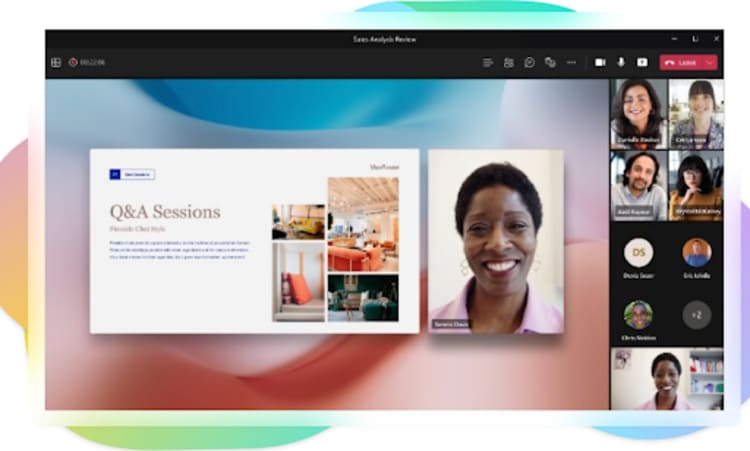
Microsoft Teams (also known as MS Teams) is a video conferencing platform that features Microsoft Teams tools like:
- chat
- voice calls
- virtual meetings
- Office 365 tools
- file sharing
Microsoft Teams aims to generate a collaborative workspace, along with a mobile application for remote work. It excels at internal collaboration, especially for enterprise users in sectors like government and finance, by leveraging its integration with Microsoft 365 and enterprise features. This platform was launched in 2017, replacing Skype for Business. Microsoft Teams generated significant user growth and engagement, becoming a core part of the Microsoft 365 business and enterprise plans. In 2018, Microsoft released the Microsoft Teams free plan, which offers longer meeting durations and more features compared to Zoom's free offering, including chat, online meetings, and file storage.
The platform offers a plethora of video conferencing capabilities, including:
- Whiteboards
- Screen sharing
- Live events
- Live captions in 28 languages
- Webinars
Microsoft Teams enables a virtual office environment, making it a decent choice for those already utilizing Office 365 and small businesses seeking an economical premium plan. Advanced security options are available through Microsoft 365 Business Premium, providing enhanced data protection and access control features.
What is Zoom?

Zoom is a cloud-based video conferencing tool designed with a user-friendly interface, utilized by businesses and individual users alike for virtual meetings, webinars, and other related activities, including Zoom meetings. Zoom leads the market in ease of use and adoption across various sectors, including education, telemedicine, and smaller organizations. It provides support for:
- Meetings of up to 100 participants
- Simultaneous screen sharing
- Virtual backgrounds
- Scheduling and calendar integrations
- Whiteboarding
- In-meeting private and group messaging, also known as Zoom chat
- The capacity to support up to 49 simultaneous video conference streams
- Advanced meeting analytics through Zoom reports
Zoom’s user-friendly interface makes joining meetings simple and accessible for everyone. With high user satisfaction, over 1,000 integrations via the Zoom Apps Marketplace, and a rich set of features, it’s ideal for teams seeking a reliable video conferencing solution.
Perfect for client-facing meetings, Zoom delivers high-quality video and dependable performance, making it popular in consulting, finance, and healthcare. Millions of users log in daily, and its free plan supports up to 100 participants for 40 minutes, offering a strong, cost-effective option for teams.
Pricing and plans: Microsoft Teams vs Zoom

When it comes to pricing and plans, both Microsoft Teams and Zoom offer free and paid options to cater to a variety of budgets and feature requirements. The free version of Microsoft Teams allows for up to 100 participants in a meeting, with limitations such as 5 GB of shared cloud storage per user and the absence of certain features like recording online meetings. On the other hand, the free-forever plan of Zoom allows for up to 100 participants to join a 40-minute session.
Microsoft Teams has different pricing plans to offer. The minimum cost is $6 per user, per month for the Microsoft 365 Business Basic plan, and the maximum comes out to be $57 per user, per month with the Microsoft 365 E5 Enterprise plan. Microsoft Teams generated significant revenue and user growth through its tiered offerings, as more organizations adopted paid plans for advanced features and integration with Microsoft 365. As teams users move to higher tiers, they can access additional collaboration tools, such as advanced meeting options, increased storage, and enhanced security features.
Zoom, in contrast, offers five pricing tiers for its Zoom business services:
- Free
- Basic
- Business
- Business Plus
- Enterprise
The paid plans start at $14.99 per month for the Pro plan, which includes features like longer meeting durations and additional cloud storage.
Ultimately, the decision between the two applications will be contingent on the particular budget and feature requirements for your organization. Comparing the pricing and plans of both platforms attentively will help you determine which one offers the best value for your needs.
User experience and accessibility
When it comes to choosing a video conferencing platform, ease of use and accessibility can make or break your team’s experience. Microsoft Teams shines as a full-fledged collaboration hub, seamlessly connecting with Microsoft 365 apps, perfect for organizations already embedded in the Office ecosystem. Zoom, on the other hand, is loved for its simplicity and intuitive interface, letting users jump into meetings effortlessly.
Both platforms cater to mobile users, offering features like virtual backgrounds, live captions, whiteboarding, and quick meeting access, so your team can stay productive anywhere. While Teams packs in advanced tools and deep integrations, it comes with a steeper learning curve. Zoom keeps things simple, making it ideal for teams who value speed and straightforward functionality.
Ultimately, the choice comes down to your team’s workflow and priorities: do you need a powerful all-in-one collaboration suite, or a sleek, no-fuss meeting platform? Understanding how each platform fits your needs is the first step to smarter, more productive virtual collaboration.
Video and audio quality comparison
Video and audio quality are key factors in ensuring a seamless and professional communication experience. Both Microsoft Teams and Zoom strive to provide good video quality for seamless meetings, with robust support for high-quality video meetings that cater to both small teams and large-scale conferences. Microsoft Teams is a modern workplace solution that integrates AI-based video optimization. It automatically adjusts the video quality as per the user’s network quality to give an optimal experience. The default video quality on Zoom is set at 720p; however, users can adjust these settings as per their preference, with detailed instructions available on their Zoom Support page.
Both platforms also offer end-to-end encryption to protect meeting data, enhancing privacy and security during video meetings and ensuring sensitive information remains secure in transit.
When it comes to audio quality, users are unlikely to observe a significant distinction between the two platforms, as this is largely dependent on individual internet connections. A comparison of the video and audio quality of both Microsoft Teams and Zoom will ensure your chosen platform provides a reliable and professional communication experience.
Collaboration features face-off

Collaboration features are a key factor in choosing a video conferencing platform, shaping how effectively teams work together during virtual meetings. Microsoft Teams offers in-meeting tools like whiteboards, personalized stickers, and seamless integration with Office apps such as OneDrive and SharePoint. Zoom provides whiteboards, chat functions, and advanced capabilities for webinars and large meetings.
Both platforms support breakout rooms for focused group discussions, integrating with chat and whiteboards to enhance collaboration. Teams’ chat works in channels and meetings with up to 100 participants on the free plan (300 on paid plans), while Zoom’s chat is only during calls, supporting 100 participants on free/Pro plans and up to 500–1000 on Enterprise.
File sharing also differs: Teams provides 1 TB per organization and 10 GB per license, whereas Zoom offers 5–10 GB per license and unlimited storage on Enterprise plans.
For organizations prioritizing internal collaboration and Office integration, Teams is a robust choice. Comparing these features helps determine which platform best suits your team and maximizes productivity.
Integration capabilities
Integration capabilities play a significant role in maximizing the functionality of video conferencing platforms, allowing users to consolidate their work and optimize productivity. Microsoft Teams integrates with:
- Outlook
- OneDrive
- OneNote
- Third-party enterprise applications like ServiceNow, Salesforce, and Trello
When comparing Zoom and Teams, Teams stands out for its deep integration within the Microsoft 365 ecosystem, providing seamless collaboration across chat, file sharing, and meetings. Unlike Zoom, Microsoft Teams enables users to collaborate on documents in real time directly within the platform, thanks to its native integration with Office apps.
This tight integration with other Microsoft apps can be advantageous for organizations already using Office 365 tools.
Zoom offers compatibility with over 1000 applications, including:
- Calendly
- Notta
- Miro
- Salesforce
By integrating with such a wide array of applications, Zoom extends its capabilities beyond video conferencing, making it a versatile choice for organizations with diverse software ecosystems. Taking into account the integration capabilities of both Microsoft Teams and Zoom can aid in selecting a platform that aligns best with your organization’s existing tools and processes.
Security and compliance showdown
Security and compliance features are critical components of video conferencing platforms, as they ensure the protection of sensitive information and adherence to regulatory requirements. Both Microsoft Teams and Zoom provide encryption, password protection, and separate waiting areas as standard security features. Additionally, Microsoft Teams offers multi-factor authentication and data loss prevention policies, further enhancing the platform’s security.
In terms of compliance standards, Microsoft Teams is compliant with FERPA, SOC, GDPR, HIPAA, and FedRAMP. Both platforms also offer compliance tools designed to help organizations meet regulatory requirements, making them suitable for businesses in regulated industries. While the knowledge base does not provide information on Zoom’s compliance standards, researching and comparing the security and compliance features of both platforms is necessary to ensure your chosen solution fits your organization’s specific requirements.
Market share and popularity
Zoom vs Microsoft Teams: Market Presence
- Both platforms are widely adopted and trusted by organizations worldwide.
- Remote work has fueled rapid growth, with millions of daily active users on each platform.
- Microsoft Teams has expanded quickly as organizations embrace collaborative tools.
- Zoom gained popularity for its simplicity and reliable video calls, especially for webinars.
- Some experts suggest Zoom’s market share has softened compared to competitors like Teams and Webex.
- Other notable video conferencing tools include Google Meet, TeamViewer, and MeetingCyberLink.
- Understanding these trends helps teams choose the platform that best fits their collaboration needs.
Kumospace: the top alternative

Looking for a video conferencing platform that’s more than just another virtual meeting tool? Kumospace might be exactly what your team needs. How often do you find a platform that combines affordability, engagement, and productivity all in one? At just $0 per user per month, Kumospace offers a cost-effective solution without compromising on quality.
Unlike traditional video conferencing tools, Kumospace creates a ‘virtual office’ experience that encourages collaboration, community, and teamwork, similar to platforms like Gather. High-quality video and audio ensure that every conversation feels natural and professional, making remote collaboration smoother and more enjoyable.
While Microsoft Teams excels with its deep Office 365 integration and Zoom shines with its simple, user-friendly interface, Kumospace brings something different to the table: an immersive, interactive workspace that turns routine meetings into engaging experiences. Could this be the platform that transforms how your team works together remotely?
By considering factors like pricing, user experience, video and audio quality, collaboration features, and security, you can choose the platform that best fits your organization. As remote work continues to grow, selecting the right tool isn’t just about video calls; it’s about creating a collaborative environment that keeps your team productive, connected, and inspired.
Summary
Video conferencing is essential for today’s remote and hybrid work environments, but with so many options, which platform fits your team best? Microsoft Teams and Zoom are two of the most popular choices, each with unique strengths.
- Microsoft Teams is a full collaboration hub, integrating deeply with Office 365 tools. It’s ideal for organizations needing a comprehensive workspace, advanced security, and enterprise-focused features.
- Zoom is celebrated for its simplicity, intuitive interface, and reliable performance, making it perfect for client meetings, webinars, and teams seeking straightforward video conferencing.
- Comparison factors include pricing, user experience, video/audio quality, collaboration tools, integrations, security, and support. Teams excels in enterprise adoption, while Zoom shines in ease of use and high-capacity meetings.
Market trends show both platforms are widely adopted, with Teams growing rapidly in collaborative enterprise environments and Zoom gaining popularity for ease and reliability.
- Kumospace emerges as a dynamic alternative, offering an immersive virtual office experience at $0 per user per month. It blends engagement, collaboration, and affordability, making it ideal for teams seeking a more interactive workspace.
Ultimately, the right platform depends on your team’s size, workflow, and collaboration needs. Whether you choose Teams, Zoom, or explore alternatives like Kumospace, the goal is to foster productivity, connection, and seamless virtual collaboration.
Frequently asked questions
Zoom offers advanced features and is more user-friendly, while Teams has better integration with Microsoft's suite of tools and more advanced security features. Zoom is best for external meetings while Teams is better suited for internal communication. Both platforms offer reliable solutions that are suitable for different types of businesses. A great alternative is Kumospace.
Microsoft Teams offers a wider range of productivity tools than Zoom, such as OneDrive and SharePoint integration, advanced chat and file sharing capabilities, as well as enhanced security features. These features make Microsoft Teams the preferred choice for increasing meeting productivity.
Microsoft Teams provides an integrated collaboration experience with Office 365 tools, while Zoom is known for its user-friendly interface and cloud-based infrastructure.
Yes, there are alternatives to Zoom and Microsoft Teams such as Kumospace, Google Meet, TeamViewer Meeting, and CyberLink.
Kumospace excels in creating a more engaging work environment by offering an immersive 'virtual office' that facilitates natural, spontaneous interactions, akin to a physical workspace. This unique platform, combined with its high-quality audio-visuals and affordable pricing, enhances collaboration and connection among remote teams, fostering a more productive and satisfying work experience.




