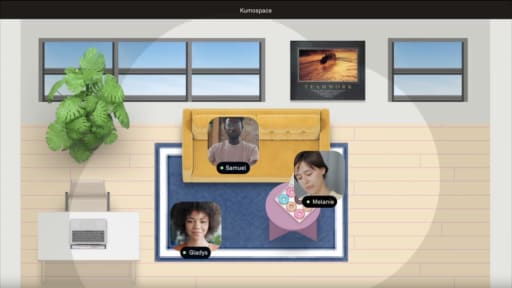
SpatialChat is built for scheduled virtual events, and Kumospace is built to run as an always-on virtual office your team keeps open all day. If you host a handful of large events each year, SpatialChat covers it well. If your team needs somewhere to work together every day, a persistent virtual office is the closer fit, and picking the wrong category leads to either an underused event platform or a virtual office nobody opens outside of scheduled calls.
The cost question follows from that split: SpatialChat bills by event pack or day pass, while a persistent office bills per seat every month, so which is cheaper depends entirely on how often your team is online.
Key Takeaways
- SpatialChat is strongest as an events platform for conferences and networking sessions. Kumospace, Gather, and Cosmos are built as persistent virtual offices for daily team collaboration, and Kumospace is usually the better fit when a team needs somewhere to work together every day rather than a few times a year.
- The pricing models reflect that split structurally: SpatialChat sells event packs, day passes, and a workplace plan billed per event or per seat, while Kumospace, Cosmos, and Gather all bill for continuous access, with Cosmos charging only for concurrent users online rather than everyone on the roster.
- Switching is less a technical migration and more a habit change. Time the move around a contract renewal and get managers using the new space daily first, since adoption stalls whenever people are left guessing which platform to open.
SpatialChat alternatives overview and comparison table
|
Product |
Best for |
Pricing model |
Adoption profile |
Main constraint |
|
Kumospace |
Persistent virtual office for remote and hybrid teams |
$16 per Member per month billed annually, or $20 billed monthly; |
Non-technical staff can start same day; culture change needed for daily use |
Free plan capped at 5 members; paid plans carry a 5-member minimum |
|
SpatialChat |
Scheduled virtual events, conferences, networking |
Business costs $8 per user per month, with Day Pass and Event Bundle options also available; |
Event planners and marketing teams; less daily-office adoption |
Browser-first experience with limited mobile functionality; free plan has no recording and caps meetings at 2 hours a day |
|
Cosmos |
Virtual offices billed by concurrent users |
$8.80/concurrent user/month; free up to 4 concurrent users |
Bills only people online at once rather than total headcount |
Paid tiers cap how many users can be online in a space at once, so large all-hands events need a higher tier |
|
Gather |
Playful 2D pixel-art virtual world with proximity audio and video |
Member-based (v2.0) or concurrent (v1.0) |
Creative teams, educators, community engagement |
Retro aesthetic can feel casual for enterprise use; cost rises with large rosters |
|
oVice |
Hybrid offices and campus-style layouts |
Per-space pricing with tiered plans |
IT-supported rollout; customizable floor plans |
Requires configuration effort for multi-floor setups |
|
Virbela |
3D immersive virtual campuses |
Custom enterprise pricing |
Needs IT support and moderate hardware; 3D world orientation |
Steep hardware requirements; not suited for quick ad-hoc calls |
|
Remo |
Networking-heavy events and trade shows |
Starting at $299/month recurring; one-time events from $699 |
Events teams with budget; staging and sponsor features |
Expensive for frequent events; scaling customization is complex |
|
Zoom Events |
Large-scale webinars and virtual conferences within Zoom ecosystem |
Add-on to Zoom Workplace plans; per-license |
Teams already on Zoom; minimal retraining |
Less spatial interaction; attendees stay in grid view |
|
Webex |
Enterprise meetings with compliance needs |
Per-user licensing with tiered plans |
IT-managed deployment; strong in regulated industries |
Lacks spatial audio and virtual-office presence features |
|
Nooks |
AI dialer with a virtual salesfloor for outbound sales teams |
Per-user subscription |
SDR and BDR teams running parallel calls |
Built for sales calling, not general team collaboration or events |
|
WorkAdventure |
Customizable virtual spaces for collaborative interaction |
Open-source core; hosted plans available |
Technical teams comfortable with map editing |
Requires design effort to build engaging maps |
|
Topia |
Interactive custom virtual worlds for events and community |
Per-event and subscription pricing |
Event designers building branded experiences |
Less suited to daily office use |
Most teams considering SpatialChat alternatives are really deciding between an events platform and a daily virtual office. The rest of this comparison focuses on SpatialChat and Kumospace specifically, since they sit at opposite ends of that split.
SpatialChat vs Kumospace head-to-head
|
Dimension |
SpatialChat |
Kumospace |
|
Ideal team |
Organizations running recurring virtual conferences, trade shows, or branded networking sessions |
Remote teams needing a daily virtual office that feels closer to real life |
|
Pricing model |
Event packs, day passes, or workplace plans; starts at $8/user/month with up to 40% savings on annual billing |
$16/member/month billed annually, or $20 billed monthly, with a 5-member minimum |
|
Strongest capability |
Stage rooms, event analytics, attendee registration, live polls, and Q&A for high-production events |
Persistent spaces, spatial audio, team presence indicators, and built-in video, chat, and document sharing |
|
Main constraint |
SpatialChat offers iOS and Android apps, while its workplace Enterprise plan currently lists storage for up to 30 meeting recordings |
The Free plan is capped at 5 Members, paid plans require at least 5 Members, and Free and Business Spaces support up to 50 concurrent Guests, with Guest access limited to four hours per week |
|
Setup effort |
Requires careful event configuration per session: room layouts, stages, access controls |
Rooms and floors open out of the box; effort is behavioral, not technical |
|
Adoption after month one |
Usage surges around scheduled events, then drops between them |
Value compounds as daily presence becomes habitual; drop-in conversations replace scheduled links |
One thing the table flattens: SpatialChat sells a workplace plan alongside its event product, so a persistent option technically exists there too. If you're comparing daily-use options rather than event venues, that workplace tier is what to price against Kumospace, not the event packs. SpatialChat now supports both virtual events and virtual-office use, while Kumospace centers its product around a persistent virtual office, so daily-use buyers should compare SpatialChat's workplace tier directly with Kumospace.
What SpatialChat does well

SpatialChat is a strong events platform for virtual conferences and networking, built around spatial audio, group discussions, and interactive rooms. Spatial audio adjusts volume based on proximity to other users, which gives presentations and audience conversations a more personal feel than a flat webinar grid.
- The platform supports large scheduled sessions with stages and breakout rooms: a stage can host a keynote for hundreds while smaller breakout rooms run workshops and group discussions in parallel, and attendees move between areas and join conversations organically.
- SpatialChat covers virtual conferences, trade shows, networking sessions, career fairs, and academic poster sessions in one interface, which cuts down on juggling multiple event tools.
- SpatialChat also integrates with document, whiteboard, and event-registration tools, so attendees can collaborate on shared content, embedded presentations, or YouTube streams without leaving the session.
- SpatialChat's pricing page lists a free plan capped at 12 participants, 2 hours of meetings a day, and no recording, which is enough for a small pilot, and it states that annual billing saves up to 40% versus paying monthly.
What Kumospace does well
Kumospace is a virtual office built first for remote and hybrid teams, with persistent floors and rooms that stay open all day rather than a link someone has to send. It runs in the browser and on desktop, iOS, and Android, which keeps adoption friction low across mixed-OS teams.
- Kumospace's always-on offices let teams drop in for ad hoc standups, daily meetings, and coworking, with rooms that can be assigned to specific projects or functions so a design team and an engineering team each have their own space while still being able to walk between them.
- Built-in tools include video conferencing, team chat, screen sharing, spatial audio, whiteboards, and document sharing, which reduces how many separate apps a team needs for day-to-day collaboration.
- Kumospace's own case studies describe strong outcomes for several customers: A Primerica sales team more than doubled its six-figure revenue after shifting to remote work in 2020 and later saved about $100,000 a year in physical-office costs while operating virtually with Kumospace, and a 25-person remote account team at Connexus used the platform to improve proactive support, collaboration, and scheduling efficiency.
- NASA has hosted a virtual recruitment event with more than 500 participants on the platform, and KPMG used Kumospace for a customized virtual office, while Deloitte used the platform for an online recruiting event for advanced-degree LGBTQ+ students.
On pricing, Kumospace's free plan is capped at 5 members, and paid plans carry a 5-member minimum starting at $16 per member per month billed annually, or $20 billed monthly. Some teams find the spatial interface takes a week or two to feel natural even though it runs entirely in the browser, and Kumospace only delivers its full value once the whole team commits to using it daily.
Key differences between SpatialChat and Kumospace that affect daily work
Persistent virtual office vs event-centric spaces
Kumospace rooms and floors stay open all day: you can see who's already in a room, drop in without an invite, and start talking the way you would walking past someone's desk, which builds a stronger sense of ambient presence for unscheduled collaboration.
SpatialChat sells a workplace tier alongside its event product, so a persistent space is technically available, but the platform's default behavior is built around configuring a space per session. Teams on SpatialChat are more likely to treat each session like a separate event link, which suits conferences but not the rhythm of daily remote work.
Collaboration workflows, group discussions, and integrations
Kumospace centers ongoing team workflows: daily standups, project rooms, and focused collaboration happen in persistent spaces where whiteboards, shared documents, and chat history stay in place from one day to the next.
SpatialChat's tooling leans toward structured event flows instead, with stages, Q&A, live polls, and attendee engagement analytics as first-class features, plus embeds for Google Docs, Miro, YouTube, and event-registration tools. If your primary need is event analytics and audience engagement metrics, SpatialChat aligns better; if you need an everyday virtual office where a remote team actually lives, Kumospace is the closer fit.
Security, governance, and compliance expectations
SpatialChat emphasizes enterprise security with SOC 2 Type II compliance, daily security scanning via Secureframe, third-party vendor risk assessments. SpatialChat says user data is encrypted at rest using AES-256 or better and network traffic is protected with TLS 1.2 or TLS 1.3; its help documentation does not describe standard meetings as end-to-end encrypted. These features help satisfy security teams at large event-driven organizations and universities.
Kumospace supports authenticated access, private rooms, domain restrictions, SSO/OIDC on Enterprise, and safe screen sharing. Regulated organizations in financial services and consulting use Kumospace for daily operations. SpatialChat lists invitation controls, password protection, assignable user roles, and plan-specific recording allowances, while Kumospace Business includes privacy and access controls and Enterprise adds SSO options. Loop in your IT and security teams before you shortlist, especially if SSO or a SOC attestation is a formal procurement requirement.
What switching between SpatialChat and Kumospace actually involves
Switching is less about moving data and more about redesigning meeting and collaboration habits, since most content in either platform (video streams, spatial layouts, live chat) is fairly transient to begin with.
- Export recordings, attendee lists, and analytics reports from SpatialChat before you downgrade. Store them in Google Drive, your CRM, or an LMS. You will not import this history into Kumospace.
- Align your pilot with the end of your current billing cycle. Run a short overlap where SpatialChat handles external events, and Kumospace handles internal collaboration.
- Run live onboarding sessions showing how to move through the spatial interface, join group discussions, use breakout rooms, and find shared documents and chat.
- Managers must model behavior by working from the virtual office daily and setting default rooms for team collaboration. A half-and-half approach where people guess which platform to open is the fastest way to kill adoption.
- Switching from SpatialChat events to Kumospace as a virtual office takes less technical effort than replacing an internal communication stack, but success depends on leadership treating the new space as the primary home for remote teams.
When a persistent virtual office is the better choice
If your team is together most working days rather than a few times a year, the calculation changes.
- Your team needs to collaborate without scheduling every interaction. If most useful conversations start with "do you have a second," a room that's already open beats a link someone has to send.
- You want one place instead of four. Kumospace runs video, team chat, screen sharing, whiteboards, and document sharing in the same space. If you're currently paying for a video tool, a chat tool, and an events platform, consolidating is worth pricing out.
- Your headcount is stable and everyone's online daily. Per-user billing is a bad deal when usage is spiky and a fine deal when it isn't. Per-seat billing rewards consistency. If most of your team is online most days, a flat monthly seat cost is easier to justify than paying per event or per day pass.
- Onboarding and mentoring matter. New hires pick up more from ambient exposure to colleagues than from scheduled calls, and that only happens somewhere people already are.
How to choose the right SpatialChat alternative
Match the SpatialChat alternative to the way your team actually works: persistent office use, large virtual events, concurrent-user billing, or a more gamified workspace.
- If your main goal is an always-on virtual office with spatial audio, breakout rooms, and daily team collaboration, Kumospace is the default choice.
- If you primarily run large, high-production virtual events a few times a year and already have an internal office solution, stay with or move to SpatialChat.
- If your top priority is HD video quality at a lower cost per active user, Cosmos is worth evaluating directly. Cosmos bills per concurrent user rather than per seat and, in its own comparisons, claims higher video resolution than SpatialChat; those specific performance claims come primarily from Cosmos's own marketing, so test video quality yourself during a trial rather than taking either vendor's comparison page at face value.
- If your culture leans into gamified, 2D spaces for community meetups or creative teams, Gather's pixel-art aesthetic and proximity audio make it a viable alternative for a more playful environment.
Choosing between SpatialChat alternatives
SpatialChat remains a strong choice when your main need is virtual events with audience engagement and flexible event-pack pricing. Kumospace and a smaller set of other spatial platforms are the better fit when you need a persistent virtual office your remote team actually uses every working day.
You may not need to switch at all if SpatialChat already matches your workload. But a short pilot of a virtual office like Kumospace, run alongside your existing tools before your next contract renewal, is usually enough to tell you which category your team actually needs.
Frequently asked questions
Yes. A common pattern is to keep SpatialChat for external events while piloting Kumospace as the daily virtual office for internal remote teams over 30 to 60 days. Running both briefly lets you see which meetings, feedback loops, and group discussions naturally fit each platform before you decide whether to consolidate.
Adoption depends less on technical setup and more on leadership behavior. Managers must commit to working from the virtual office daily, schedule key rituals like standups and sprint reviews there, and avoid falling back to ad hoc video links. Clear norms, such as default rooms for focus time and social breaks, help remote teams create a stronger sense of belonging and know where to be.
Your existing SpatialChat recordings, attendee lists, and analytics remain in your SpatialChat account or can be exported to external storage before you close or downgrade. You will not import this history into Kumospace or another virtual office, but you should keep files organized in Google Drive, Notion, or your CRM for future reference.
Align your switch with the end of your current billing cycle, using the last month to pilot the new platform while retaining full access to the old one. For annual contracts, you can often negotiate shorter renewal terms or event-only add-ons while you finalize your move to a new virtual office or events platform.
Model costs based on how often and how many people will be online at once, not just total headcount. Some SpatialChat alternatives like Cosmos use concurrent-user pricing, while SpatialChat commonly uses per-user or per-event pricing. Model SpatialChat pricing against the alternatives on two axes: multiply your expected concurrent users by the per-seat or per-event rate, then check each option against the features you actually need, such as recording, guest limits, and admin controls.