
Remote and hybrid work have made video conferencing a core part of daily business operations, from team meetings and client presentations to company-wide collaboration across time zones. As organizations become more distributed, choosing the right video conferencing platform has a direct impact on communication, productivity, and team engagement.
Modern video conferencing tools do far more than support virtual meetings. Many platforms now include collaboration features like screen sharing, breakout rooms, virtual offices, meeting recordings, and integrations with workplace apps. With so many options available, businesses need solutions that balance reliability, security, ease of use, and collaboration features that fit their workflows.
Key takeaways
- Video conferencing has become an essential tool for businesses of all sizes, requiring investment in hardware and software.
- Popular video conferencing platforms offer features to enhance collaboration and communication across remote teams.
- Strategies such as setting an agenda, leveraging AI technology, and optimizing video quality settings can maximize the effectiveness of virtual meetings.
The evolution of video conferencing in business
The landscape of business has evolved remarkably over the past few years, with video conferencing playing a critical role in bridging the gap between remote teams. The best video conferencing solutions provide seamless and efficient ways for individuals to connect in real-time, transforming the way businesses collaborate and communicate. For small businesses, video conferencing offers the opportunity to expand their client base, facilitate remote work, and streamline communication, making it an indispensable tool in today’s digital age, as these solutions can scale to support both small teams and large businesses.
The relevance of video conferencing has grown, particularly in the prevailing remote work environment. Platforms like Google Meet offer a free version accessible with a Google account, making it an economical choice for solopreneurs and startups, with many platforms providing a robust free plan suitable for small teams and startups. Video calls allow teams to conduct:
- Remote interviews
- Onboarding sessions
- Employee training
- Team-building events
Meeting recordings can be invaluable for sharing content with absent team members or for training purposes.
Key features to look for in video conferencing software

Choosing the best video conferencing software is key to fully utilizing the potential of virtual meetings. The software should provide:
- High-quality audio and video
- Features that promote collaboration and boost productivity
- Screen sharing capabilities
- Meeting recording options
- Seamless integration with popular office tools
- Collaboration tools such as team chat and whiteboards
- Virtual backgrounds for customization and privacy
- Live transcription for real-time, accessible meeting notes
Understanding these important features and their impact on the virtual meeting experience is beneficial. A modern collaboration platform integrates various collaboration tools and collaboration technology to enhance teamwork and productivity.
Screen sharing capabilities
Screen sharing is a powerful feature that enables participants to view presentations, designs, and documents in real-time during a video conference. This capability fosters collaboration by allowing teams to work on documents simultaneously and discuss ideas as they evolve.
Screen sharing also enhances engagement by keeping participants focused on the shared content, reducing the likelihood of distractions, and ensuring everyone is on the same page.
Meeting recording options
Meeting recording options are an invaluable feature in video conferencing software, allowing businesses to:
- Review and share important discussions
- Ensure clear communication and proper documentation
- Use recorded meetings for training purposes
- Share recordings with team members who couldn’t attend
- Refer to recordings when clarifying complex information
- Store and share recordings via cloud storage for easy access and collaboration
Meeting recording options offered by video conferencing platforms cater to the varied requirements of businesses and boost overall efficiency.
Seamless integration with popular office tools
Seamless integration with popular office tools, such as Microsoft Office and Google Workspace, streamlines workflows and enhances productivity. By allowing users to easily share files, calendars, and other relevant information, integrated video conferencing software simplifies collaboration and ensures a smooth transition between document work and virtual meetings.
Therefore, selecting a video conferencing platform that integrates well with your existing office tools can enhance productivity and strengthen team collaboration.
Top video conferencing platforms for enhanced business communication

Having discussed the essentials of video conferencing hardware and key features to consider in software, next, we examine some leading video conferencing platforms that cater to the varied needs of businesses.
Each platform offers unique features and benefits that can enhance business communication and foster collaborative experiences.
Kumospace: the all-in-one collaboration hub

Kumospace combines video conferencing, collaboration tools, and virtual office functionality into one immersive platform designed for remote and hybrid teams. Instead of relying on static meeting grids, Kumospace creates interactive virtual spaces where teams can move between conversations naturally, collaborate in real time, and build stronger day-to-day connections. Features like spatial audio, screen sharing, digital whiteboards, interactive displays, customizable workspaces, and background noise suppression help make meetings feel smoother, more engaging, and easier to manage.
Kumospace also supports a wide range of workflows, including team meetings, onboarding sessions, workshops, client presentations, virtual events, and collaborative brainstorming. Its virtual office environment encourages spontaneous conversations and faster collaboration while helping distributed teams stay connected across locations.

Recognized by G2 for usability, Kumospace gives businesses a more flexible and engaging alternative for online communication and teamwork.
Zoom: A versatile choice for diverse meeting needs
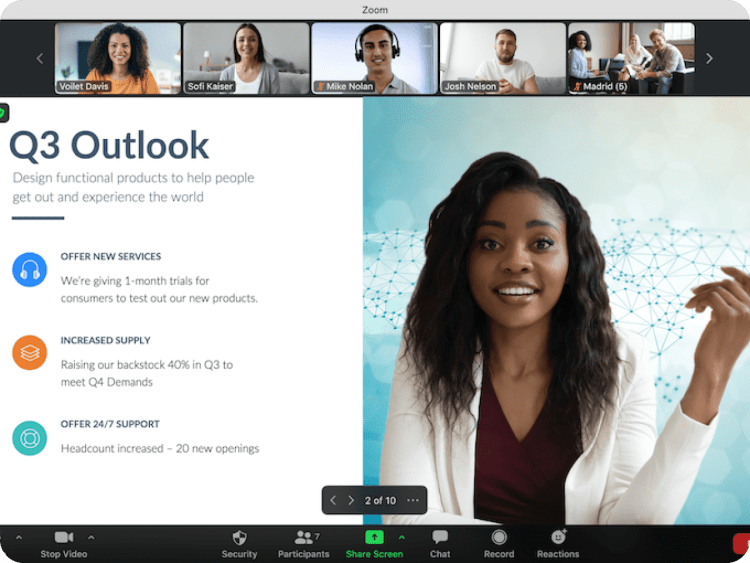
Zoom is a versatile choice for diverse meeting needs, offering a wide range of features and integrations for businesses of all sizes. Some key features of Zoom include:
- Robust collaboration capabilities
- Cross-platform compatibility
- Advanced security and privacy protocols
- Extensive meeting capacity
- AI tools such as automated captions and meeting summaries
Zoom Meetings also offers breakout rooms, allowing participants to split into smaller group discussions within larger virtual meetings. Note that the free plan has specific meeting duration limits, which may affect longer sessions.
With these features, Zoom is an ideal solution for businesses seeking a comprehensive and user-friendly video conferencing platform.
Yet, it’s important to be aware of potential security vulnerabilities and take necessary safeguards when using Zoom.
Microsoft Teams: fostering collaborative experiences
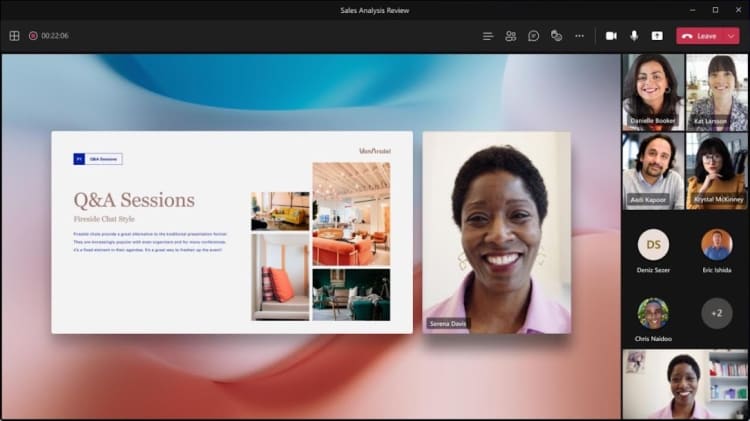
Microsoft Teams fosters collaborative experiences by integrating with Office 365 and offering robust video conferencing features. As part of the Microsoft ecosystem, Teams provides seamless calendar transition, file-sharing options, and a familiar interface for users accustomed to Microsoft products. Microsoft Teams Rooms and Teams Rooms offer integrated hardware and software solutions designed to enhance meeting spaces, providing certified devices and features that improve the overall video conferencing experience.
Microsoft Teams is a suitable choice for businesses that rely heavily on Microsoft Office and desire a tightly integrated video conferencing solution. Microsoft also offers a full suite of services to support the deployment, configuration, and user adoption of Teams Rooms.
Google Meet: Easy Access for Google Workspace Users

Google Meet provides easy access for Google Workspace users, with seamless integration and a user-friendly interface. Offering unlimited Google Drive storage for five or more users, Google Meet is an excellent option for businesses leveraging Google Workspace.
With features such as real-time document annotation and editing, an AI-powered smart assistant, and remote control capabilities, Google Meet is a cost-effective and feature-rich video conferencing solution for businesses of all sizes. Additionally, Google Meet provides international dial-in numbers, making it easy for participants from around the world to join meetings and ensuring global connectivity.
Strategies for effective video meetings
For effective video meetings, creating an environment that promotes clear communication and engagement among participants is important. Here are some tips to help you achieve that:
- Share a meeting agenda in advance.
- Test your internet connection to ensure a smooth meeting experience.
- Choose appropriate settings to minimize background noise and distractions.
- Be punctual and start the meeting on time.
- Utilize necessary tools and technology, such as screen sharing and file-sharing capabilities, to enhance collaboration and productivity during the meeting.
- Summarize action items at the end of each meeting to ensure everyone is clear on next steps and responsibilities.
Beyond the technical aspects, promoting effective communication is key to successful video meetings. Here are some tips:
- Ask open-ended questions and solicit feedback from participants.
- Use appropriate gestures, facial expressions, and eye contact to emphasize communication.
- Remain present and genuine during the meeting.
- Recognize every individual in the meeting.
- Avoid distractions.
- Listen attentively without interrupting others.
- Use digital sticky notes for brainstorming and collaborative ideation, allowing participants to visually share and develop ideas in real time.
Implementing these strategies can lead to productive and engaging video meetings for your team.
Leveraging AI-Powered smart assistants in video conferencing

Utilizing AI-powered smart assistants in video conferencing can significantly boost meeting efficiency and offer insightful data for businesses. These smart assistants can:
- Automate routine tasks
- Provide real-time support
- Optimize audio and video quality
- Simplify navigation during video conferences
By leveraging AI-powered smart assistants, such as Fireflies, Airgram, and Krisp, businesses can streamline their virtual meetings and ensure a more efficient and personalized experience.
Incorporating AI-powered smart assistants into your video conferencing software can enhance productivity in several ways:
- Real-time transcription: AI can transcribe the conversation as it happens, making it easier to review and reference later.
- Translation: AI can provide real-time translation services, allowing participants to communicate in different languages.
- Facial recognition: AI can identify participants and provide relevant information about them, such as their name and job title.
AI integration not only automates tasks but also elevates the overall collaboration experience by leveraging advanced collaboration technology, such as intelligent camera controls and seamless content sharing, to make meetings more productive and engaging.
By embracing AI-powered smart assistants, businesses can improve collaboration, communication, and overall efficiency in video conferencing.
Cost-efficient video conferencing solutions for small businesses

For small businesses, affordable video conferencing solutions are necessary for effective communication without excessive expenditure. Some benefits of cloud-based video conferencing platforms include:
- Subscription-based payment structures eliminate the need for costly conference rooms and hardware investments
- Compatibility with personal devices
- Accessible through a web browser
- Ideal choice for small businesses with limited resources
By selecting a video conferencing solution that offers essential features at an affordable price, small businesses can leverage the benefits of video conferencing without incurring substantial costs. As remote work becomes increasingly prevalent, cost-efficient video conferencing solutions will play a crucial role in enabling small businesses to thrive in the digital landscape.
Maximizing video quality in virtual meetings

Guaranteeing optimal video quality in virtual meetings is necessary to maintain a professional and engaging experience for all participants. To maximize video quality, you should:
- Select a quiet location with no background noise
- Close blinds on windows for better visibility
- Wear neutral, solid-colored clothing
- Test your equipment and internet connection before the meeting
- Use a headset or earbuds for better audio quality
By following these tips, you can ensure that your video meetings are of the highest quality.
Also, consider lighting and background settings, which can significantly influence the video quality in virtual meetings. Use the right amount of light to avoid a dark, grainy video or overpowering brightness. Choose a suitable background that is not cluttered or busy, eliminating distractions for participants. Many video conferencing solutions for business offer virtual backgrounds, allowing you to enhance privacy and create a more professional appearance during meetings. By optimizing these factors, you can significantly improve the overall video quality and create a professional and engaging virtual meeting experience for your team.
Summary
Video conferencing has become essential for modern businesses, helping remote and hybrid teams collaborate across meetings, onboarding, training, and client communication. Today’s platforms offer far more than video calls, with features like screen sharing, meeting recordings, breakout rooms, AI-powered tools, virtual backgrounds, and integrations with workplace apps that improve productivity and communication. Choosing the right platform depends on balancing reliability, ease of use, collaboration features, security, and cost, especially as businesses continue adapting to distributed work environments.
Platforms like Kumospace, Zoom, Microsoft Teams, and Google Meet each support different business needs. Kumospace stands out by combining video conferencing with immersive virtual office spaces, spatial audio, digital whiteboards, and interactive collaboration tools that make remote communication feel more natural and engaging. Meanwhile, strategies like using meeting agendas, leveraging AI assistants, optimizing video quality, and encouraging active participation help teams run more productive and effective virtual meetings.
Frequently Asked Questions
Zoom has quickly become the most popular video conferencing solution for business, offering features such as easy setup and an integrated business communications platform. It is a favorite among virtual and hybrid educators and is free to use.
Businesses can use video conferencing to facilitate visual communication with clients and colleagues, save energy and money, and reduce environmental impact. It can be used for team meetings, webinars, product demos, job interviews, and more, allowing people to connect regardless of location.
To use video conferencing, you need a computer, high-speed internet connection, webcam, microphone, and software or application. These are the five essential requirements to effectively utilize video conferencing technology.
The average cost of video conferencing equipment ranges from $1,000 to $10,000, depending on the size and quality of the setup. Pre-paid plan software services typically range from $24 to $79 per month.
When choosing a video conferencing platform for your business, consider the features offered, such as screen sharing and meeting recording, as well as security measures. Ensure that you select a platform with reliable security and seamless integration.




