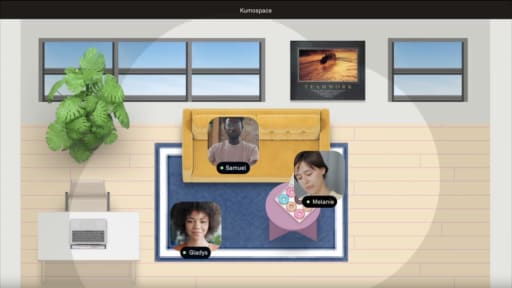
For teams comparing Virbela alternatives, Virbela is built around immersive 3D campuses and structured programs, while Kumospace is designed as a browser-based virtual office for everyday remote work. One asks your team to walk avatars through a branded 3D campus; the other opens in a browser tab and stays running next to your other tools all day. Picking the wrong one means either overbuilding a lightweight need or underbuilding a genuine campus-scale program.
Virbela, founded in 2012 out of research at the University of California San Diego, focuses on large-scale virtual worlds and metaverse-style campuses for training, education, and flagship events. Kumospace focuses on a lightweight, always-on virtual office with native video, chat, and screen sharing built in.
Key Takeaways
- Virbela builds immersive 3D worlds with avatars and spatial audio, strongest for enterprise metaverse campuses, leadership simulations, and large virtual events. Kumospace is a browser-based virtual office optimized for daily standups, coworking, and hybrid presence.
- Rollout effort differs sharply: a Virbela Private Campus behaves like a formal project with custom world design and training, while Virbela Go and Kumospace can both start as a single-team pilot with browser access and per-seat pricing.
- The simplest starting rule: if you need remote workers to live in a virtual office all day with no install, start with Kumospace; if you need a branded campus for thousands of employees or students, start with Virbela.
Virbela competitors and alternatives at a glance
Virtual office platforms split along two axes: how immersive the space feels, and how much setup it demands before your team can use it. Platforms like Gather and Kumospace favor spontaneous interaction and quick adoption, while platforms closer to Virbela favor immersive, campus-scale collaboration.
|
Product |
Best for |
Pricing model |
Adoption profile |
Main constraint |
|
Virbela |
Enterprise metaverse campuses, leadership development, large virtual events |
Per seat from $10/user/month (Virbela Go); |
Avatar-based 3D world; desktop client for full immersion, browser for Go tier |
Full 3D worlds require IT coordination and formal onboarding |
|
Kumospace |
Daily virtual office for remote and hybrid teams |
Free up to 5 members; |
Browser-based; feels close to video conferencing with spatial layout |
Whole-team adoption needed for full value |
|
Sococo |
Map-style virtual office for presence visibility |
$13.49/seat/month when annually prepaid, 10-seat minimum; |
Simple floor-plan view; minimal learning curve |
Limited immersion; fewer interactive features |
|
Spot |
Lightweight virtual HQ for small-to-mid teams |
Per-seat SaaS |
Browser-based; quick onboarding |
Smaller feature set than full virtual office suites |
|
Tandem |
Teams wanting virtual office integrated with existing meeting tools |
Per-seat SaaS |
Minimal interface; integrates with calendars and channels |
Less spatial; more status-board than virtual space |
|
Wurkr |
Visual presence and accountability for distributed teams |
Per-seat SaaS |
Video-tile dashboard; low friction |
Focused on visibility, not spatial interaction |
|
Orbital |
Async-first teams needing lightweight virtual rooms |
Per-seat SaaS |
Browser-based; drop-in rooms |
Limited event or campus features |
|
Frame (FrameVR.io) |
3D immersive rooms for education and workshops |
Free tier; paid plans for larger rooms |
WebXR; runs in browser with optional VR headset |
Best for small sessions, not enterprise-wide daily office |
|
ENGAGE XR |
VR training and virtual events for enterprise |
Custom enterprise pricing |
Requires VR headset for full experience |
Hardware dependency limits daily use |
|
Gather |
Playful persistent virtual spaces for remote team collaboration |
No free tier; Gather 2.0 costs $15/member/month or $12/member/month billed annually, |
2D retro-game aesthetic; browser-based |
Gather's retro 2D visual style may feel too casual for teams that want a more formal enterprise environment |
|
HyperFair |
Virtual trade shows and online events |
Custom event-based pricing |
Browser-based event platform |
Event-focused; not a daily virtual office |
|
Pesto |
Remote work with avatar-based communication |
Per-seat SaaS |
Lightweight avatar interface |
Small feature set and limited integrations compared with established virtual office platforms |
Most teams considering Virbela alternatives are really deciding between two approaches: a full 3D enterprise metaverse, or a browser-first daily virtual office. The rest of this article narrows to that comparison, Virbela versus Kumospace, since they sit at opposite ends of the spectrum.
Virbela vs Kumospace head-to-head
The table below lines up the two platforms directly across the factors that tend to decide adoption: who each one is built for, what it costs, and where it runs into friction.
|
Virbela |
Kumospace |
|
|
Ideal team |
Organizations running large remote workforces, training programs, or virtual campuses needing avatar-based interaction |
Knowledge and operations teams that want an everyday virtual office for meetings, coworking, and ad-hoc collaboration |
|
Pricing model |
Virbela Go: $10/user/month billed monthly or $8/user/month billed annually, with a 5-user minimum for Starter and 25-user minimum for Pro; |
Free plan up to 5 members; |
|
Strongest capability |
Enterprise metaverse with immersive 3D worlds, virtual auditoriums, leadership simulations |
Persistent spatial office with integrated video conferencing, team chat, screen sharing, and spatial audio |
|
Main constraint |
Private Campus needs a desktop client and a longer configuration cycle; Virbela Go runs in browser |
Value depends on whole-team adoption; spatial interface takes some teams a week or two to feel natural |
|
Setup effort |
Custom world design, branded environments, formal training; weeks to months for Private Campus |
Browser-based rollout; a team can start in a day with minimal IT involvement |
|
Adoption after month one |
Usage often tied to scheduled events, training cohorts, and structured programs; daily drop-in culture requires deliberate effort |
Usage grows when managers hold standups, one-on-ones, and casual check-ins inside the space; presence becomes habitual |
What Virbela does well
Virbela began in 2012 at UC San Diego as a partnership between the Rady School of Management and the university's Experimental Game Lab by organizational psychologists Alex Howland and Ron Rembisz, with Erik Hill building the platform out of the Experimental Game Lab, backed by a $1.74 million Graduate Management Admission Council innovation grant, per UC San Diego. The original idea was to let MBA students from multiple countries collaborate on business simulations inside a shared virtual world.
That campus-building instinct still defines the product. Users walk avatars through branded buildings, enter auditoriums, and interact in expo halls, and large-scale virtual events run through breakout rooms, keynote stages, and spatial audio zones built to handle hundreds or thousands of attendees at once. Virbela previously operated as part of eXp World Holdings, the parent company of eXp Realty, which used a Virbela-powered virtual campus as a digital headquarters for its distributed real estate workforce; the sale closed in November 2024 and Virbela announced the reacquisition the following January, refocusing on education, leadership, and enterprise customers.
Practice Ground by Virbela is a dedicated environment for leadership development, where managers rehearse difficult conversations through AI-powered simulations and get behavioral data back as feedback, a direct extension of the company's roots in organizational psychology and distance learning.
What Kumospace does well
Kumospace is a virtual office platform for remote teams, built around a persistent spatial layout that stays open throughout the workday rather than a room you drop into for a scheduled call. It runs in the browser and on desktop, iOS, and Android, which keeps adoption friction low compared to heavier VR environments and makes it workable across mixed-OS teams.
Native capabilities include video conferencing, webinars, team chat, screen sharing, spatial audio, an online whiteboard, and document sharing, combined into one workspace instead of split across Slack, Zoom, and Google Drive. Proximity-based audio lets people hear and see each other as avatars get closer, which gives casual hallway-style conversations somewhere to happen that a scheduled meeting link doesn't replicate.
Kumospace's own case studies describe strong results at several organizations: Primerica sales leader reported saving $100,000 a year in office rent after moving his Akron team into a Kumospace virtual office. A 25-person Connexus account team reports improved productivity after adopting Kumospace. In September 2021, NASA hosted its fall internship recruiting event in Kumospace for more than 500 undergraduate and graduate students. In October 2021, Deloitte used Kumospace for an LGBTQ+ recruiting event attended by about 50 students and 10 staff, while a KPMG team in Vancouver used a customized Kumospace virtual office for meetings and socials involving up to 150 employees.
Differences that change your daily remote work

These three dimensions determine whether Virbela or Kumospace fits your team's actual work patterns. Each one changes behavior, not just features.
Immersion level and virtual reality vs browser comfort
Virbela's fully 3D worlds create a presence that can feel like walking around an actual campus, which is powerful for leadership simulations, onboarding cohorts, and flagship events where a sense of place matters. Kumospace uses 2D avatars in a browser-based spatial layout rather than Virbela's fully 3D avatar world. Virbela tends to feel like somewhere you "go into" for a specific session; Kumospace tends to stay open all day as a persistent space.
Use cases: virtual events, leadership development, and daily remote work
Virbela's auditoriums, expo halls, and campus-scale environments serve training organizations, universities, and enterprises running global programs. Virbela's auditoriums, expo halls, and campus-scale environments serve training organizations, universities, and enterprises running global programs, such as sales kickoffs, university open days, or conferences with thousands of attendees. Kumospace is built for continuous use: recurring meetings, ad-hoc conversations, and hybrid presence for teams that would otherwise live entirely in Slack and Zoom. A product team's daily standups or a marketing team's brainstorm room both fit Kumospace's model more naturally than Virbela's.
Rollout, adoption, and IT ownership
Virbela deployments often involve custom world design and formal training, sometimes anchored to a specific program like a leadership cohort or a university campus, and the investment includes configuration and potential desktop client installations. Kumospace can start as a pilot for a single team, shared like a video call link, with security review and SSO support available at the Enterprise tier once you're ready to scale. The ongoing ownership burden is lighter for Kumospace since there's no custom world to maintain, but Virbela's campus model can justify the heavier investment if your use case genuinely needs the immersion.
When Virbela is the better choice

You're building an enterprise metaverse or virtual campus for a distributed workforce and event spaces. That's the use case Virbela was designed for at UC San Diego.
Your primary goal is leadership development or experiential learning, and you plan to use Practice Ground or similar environments to simulate difficult conversations and gather behavioral data at scale. No lightweight virtual office replicates that.
You regularly host large conferences, education programs, or online events where an immersive 3D experience with avatars and virtual stages matters more than lightweight, always-on daily collaboration.
What switching between Virbela and Kumospace actually involves

Switching in either direction is less about complex data migration and more about retraining people, updating rituals, and managing contract overlap, so time your move around a renewal date rather than mid-cycle.
Data in each platform consists of room layouts, user accounts, chat history, and recordings of virtual events. Export or archive anything critical before canceling, since you can't import an environment directly into the other platform; plan to recreate only the rooms people actually use. A practical switching plan: launch a pilot space in the new platform for one team, run both tools in parallel for a few weeks, shift key meetings and rituals over, gather feedback, then deprecate the old environment once adoption stabilizes.
Leadership has to model usage in the new space for this to stick. All-hands meetings, leadership development sessions, and daily standups need to actually move over, or people end up split across two worlds indefinitely. If you're heavily invested in custom Virbela environments, budget extra design and change-management time when switching to Kumospace, and the same applies in reverse.
How to choose between Virbela, Kumospace, and other virtual offices
- If you want a persistent virtual office that replaces most daily Zoom links for a remote software or marketing team, pick Kumospace.
- If your top priority is an immersive, avatar-driven virtual campus for education or leadership development, pick Virbela.
- If you mainly need a simple map-style view of who is online and in which room without spatial audio or virtual worlds, pick Sococo.
- If you want a virtual office tightly integrated with your existing meeting tools and channels in a minimal interface, pick Tandem.
Summary
Virbela earns its cost when you're building an enterprise metaverse or a leadership development lab where immersion and scale genuinely matter. Kumospace earns its cost when you need a practical virtual office where a distributed team connects, collaborates, and coworks every day without a heavy rollout.
If your leadership programs or virtual campus are already driving strong engagement, that's not a reason to switch. The best Virbela alternative depends on whether your team needs an always-on virtual office for daily work or an immersive 3D campus for structured programs, training, and events.
Frequently asked questions
Yes. Many teams run both in parallel for a few weeks, using Virbela for existing programs like leadership development or virtual events and piloting Kumospace as a daily virtual office for one or two teams. Keep meeting links and expectations clear so people know which workspace to use for which purpose during the overlap period.
Adoption depends more on leadership behavior and rituals than on features. Managers must hold key meetings and working sessions inside the chosen virtual office consistently. Clear norms, lightweight training, and making the space useful for everyday tasks rather than only special events are what keep people coming back.
Most data consists of room configurations, user accounts, chat logs, and event recordings. Export or archive these according to each vendor's documentation before canceling. Before canceling either platform, confirm which chat history, recordings, account data, and other records can be exported and archived under the vendor's current documentation.
Time your pilot in the new platform to start one to three months before your renewal date on the old one, so you can decide with real usage data whether to renew, downgrade, or cancel. In some cases, it is worth paying for a short period of overlap to avoid rushing change management or disrupting critical leadership development sessions or virtual events.
Compare the full cost of ownership for each, including license or subscription fees, any required services or setup work, and the time managers spend on rollout and training for your specific headcount. Model two or three realistic usage scenarios, such as 50 daily virtual office users or a 500-person virtual event, and ask each vendor for pricing aligned to those scenarios before deciding.