Virtual charades is a guessing game played over a video call: one player silently acts out a secret prompt on camera while everyone else races to guess the word or phrase before a timer runs out. You’ll need four things before the first round: a host, a private prompt list, a visible timer, and one agreed way to submit guesses.
Skip the shared guessing method and a video round turns into crosstalk fast: quieter teammates stop offering answers, and virtual charades loses the group energy that makes it fun. Group size decides the format, from one cooperative group to parallel games running at the same time.
Key Takeaways
- Virtual charades is a party game where one player silently acts out a prompt on camera while everyone else guesses within a time limit. It runs on any video call in eight steps.
- Routing every guess through one channel, such as hand-raising, chat-only guessing, or a single designated caller, keeps a video round from turning into crosstalk.
- Hybrid games stay fair when one room camera faces the actor, in-room and remote players use the same guessing method, and actors alternate between both locations.
When to use virtual charades for team building

Virtual charades is a flexible party game that works as an icebreaker, an energizer between agenda items, or a dedicated team-building block in recurring remote or hybrid meetings. Players can use a charades app for virtual team building, but the game works just as well with a shared document and a phone timer.
You can play charades on your usual video call platform, such as Zoom, Google Meet, or Microsoft Teams. Before the first round, test the actor’s camera view, your guessing channel, and a private way to send prompts. A dedicated online charades session can run 30 to 60 minutes, though even a 5-minute opener with two or three rounds adds energy to a meeting. Prompts can be work-themed, pop culture, or everyday actions, as long as they’re simple enough to act out on camera and appropriate for everyone in the group.
How do you play virtual charades over a video call?
Before the first round, gather your group on a video call. Have a private prompt list that only the host can see, set up a visible timer, and agree on one guessing channel. These steps let you play charades online without a dedicated charades app, as long as the host keeps the prompt list private and picks a format that fits your group size and time.
Step 1: Set up the camera view
Whoever is acting needs their camera on with enough room to show their face, hands, and upper body, seated or standing. Encourage others to keep cameras on for reactions, but anyone who prefers can keep their camera off and guess from chat. For a clear view, the host can spotlight the actor where the platform supports it, or each participant can pin the actor in their own view.
Test lighting and background before the first round so gestures read well on a small screen. Phone users should test both portrait and landscape orientation before play and use whichever keeps the actor's hands and gestures in frame.
Step 2: Pick teams or play as one group
You have two main options:
- Team against team: Suits groups who want competition. For a group of 8 to 20 people in total, split players into two or three teams.
- One cooperative group: Players take turns and share a score. This suits smaller groups of 4 to 8 people and teams that prefer not to compete.
Keep teams as close in size as you can, and give each team the same number of scored turns even when sizes differ. Willing actors can repeat a turn if needed. You can rename participants with team labels, like “Alex, Team Blue,” to make acting turns and scoring easier to track.
Step 3: Set the timer
A 60-second timer per round works for most virtual charades games. If your prompts are very simple, like easy warm-ups or animals, try shorter 30-second rounds.
The host should use a visible countdown so everyone feels the time pressure. A phone timer held up to the camera, an on-screen timer, or a built-in meeting timer all work. Agree up front on how many rounds you’ll play based on your time window, allowing a minute or two per turn for prompt delivery, acting, and scoring. Offer a second full turn only if time remains.
Step 4: Pick the first actor
For the very first turn, choose a confident volunteer or someone comfortable on camera to model the game for others. To set the order, go alphabetically by first name or spin a virtual wheel. Then post the numbered order in the meeting chat so everyone sees the same sequence. Before each round, remind the group which team or person is acting and who is allowed to guess.
Step 5: Give the actor a private prompt
The host sends the actor the prompt by private message, double-checking the recipient before sending. Never display the prompt through the main meeting’s screen share.
You don’t need a charades app for this. A document or spreadsheet of numbered prompts works fine, as long as only the host and any non-playing co-host can open it. A random word generator works too, and the host can use a random number picker to select from the list. Only the actor should see the prompt. Give them a few seconds to think before the timer starts, especially for trickier movie titles or famous quotes.
Step 6: Run the round with no talking or props
The house rule is simple: no verbal clues and no props. That means:
- No speaking or sounds
- No written words or letters spelled in the air
- No props, and no pointing at objects with visible text
A sound-effects version is an optional variation the group can agree on before play.
The host starts the timer, announces “Go,” and everyone watches the actor convey the answer using only body movements and gestures. Actors should use big, clear motions that read well on a small video window and stay within their camera frame.
Step 7: Handle guesses and scoring
Guesses go through the one channel the host announced before play; the section below covers hand-raise, chat-only, and caller methods in detail. Teams earn points for each correctly guessed word: once an eligible player submits the correct answer through the agreed channel before the timer runs out, the team or group earns one point, and the host can record it on a simple shared tally. If time runs out with no correct guess, reveal the answer and award zero points, then move to the next word.
Step 8: Rotate to the next actor
Rotate actors so each willing person gets a turn, switching teams or individuals according to the format chosen at the start. Anyone who would rather not act can pass and stay in a guessing or scoring role. Keep the game flowing by having the next actor ready, with their prompt chosen while the previous round is being scored. Wrap up after the pre-agreed number of rounds and announce the winning team, or share a quick debrief question like "What was the hardest prompt to act out?" to close the session.
How to keep virtual charades guesses orderly on video

Choose one guessing method before play starts and announce it to the group.
- Hand-raise: Works well for mid-sized teams. Guessers physically raise a hand or use the platform’s hand-raise button, and the host calls on them in order so guesses are heard one at a time.
- Chat-only: Everyone types guesses, and the host watches for the first correct answer in the chat thread. This is especially helpful for large or noisy groups.
- Designated caller: Works for competitive play. Each team assigns one caller who is allowed to speak guesses out loud, reading from guesses teammates send in a separate team-only chat, since the main meeting chat is visible to everyone. This keeps the room quiet enough for everyone to hear while still feeling lively.
Virtual charades prompts for teams
Start with easy warm-ups or everyday actions, then add work situations or movie references your group recognizes. Keep chosen prompts in the host’s private list. The prompts below are starting points. Pick ones that suit your group’s camera space and comfort, and swap out any references people may not know. Let an actor trade a prompt without penalty, and keep every prompt appropriate for a work audience.
Easy warm-up prompts
- Brushing your teeth
- making a sandwich
- answering the phone
- baking a cake
- tying shoelaces
- miming a sneeze
- opening an umbrella
- taking a selfie
Work and office prompts
- Missing a deadline
- leading a brainstorming meeting
- answering a support ticket
- presenting a slide deck
- rushing to a stand-up
- fixing the printer
- discovering the coffee machine is broken
- asking for a day off
Remote work life prompts
- Talking while on mute
- unstable Wi-Fi
- surprise doorbell delivery
- cat walking across the keyboard
- virtual happy hour
- working from a cafe
- kids interrupting a call
- searching for headphones
Movie and TV prompts
- Star Wars lightsaber duel
- The Matrix bullet dodge
- Jurassic Park T-Rex chase
- The Lion King lifting Simba
- Titanic "I'm flying" scene
- superhero landing pose
- detective solving a mystery
- silently reacting to a scary movie
You can also draw from animated movies, cartoons, or TV characters your team watches.
Action and animal prompts
- Walking a dog
- swimming in a pool
- juggling
- riding a bicycle
- elephant spraying water
- monkey eating a banana
- bird learning to fly
- turtle moving slowly
Add a dance move or a food-themed prompt like "eating spaghetti" if you want variety.
How do you run virtual charades with hybrid teams?
Position one main camera and microphone in the physical room so remote players can see and hear the in-room actor. Before scoring begins, have a remote participant confirm they can see the actor’s full gestures and hear any spoken guesses clearly.
Everyone, in the room and remote, should use the same guessing method. In competitive play, only the active team guesses during its turn, with the same timer and scoring rules for both locations. Alternate actors between in-room and remote people, turning the main camera toward whoever is acting, so the game stays fair and no one is left on the sidelines.
Best formats for online charades with remote teams
One cooperative group suits a small call, and team-versus-team play suits groups who want competition. Parallel small groups work when a single acting queue would leave people waiting too long. If you plan to compare scores across teams or groups, use the same time limit, scoring rules, guessing method, number of turns, and similar prompt difficulty. Creative twists add variety to the standard game: in Reverse Charades, the whole team acts while one player guesses, and in Emoji Charades, players describe the prompt using only emojis in the meeting chat.
|
Format |
Suggested group size |
What you need |
Main tradeoff |
|
Team vs team |
8 to 20 |
A facilitator, private prompt bank, timer, and one guessing channel per team |
Quieter players may get overshadowed by louder guessers |
|
One group taking turns |
4 to 8 |
A facilitator, private prompt bank, and timer |
Lower competitive energy; pace can slow with larger groups |
|
Small breakout groups |
12 or more, split into groups of 4 to 6 |
A facilitator, private prompt bank, and timer for each parallel group |
Consistency across groups is harder to maintain |
If you plan to compare scores across teams or groups, use the same time limit, scoring rules, guessing method, number of turns, and similar prompt difficulty.
How to prepare and host your first virtual charades session
Before the session, settle these:
- Choose your video call platform.
- Test the actor’s camera view and private prompt delivery.
- Prepare a host-only prompt bank with ideas from the categories above.
- Choose the guessing method.
- Agree on scoring and the session time limit.
Send calendar invites with the meeting link and duration. Ask actors to join with cameras on and enough space to stand. Explain that acting is optional and seated gestures are welcome.
A sample agenda:
- 2-minute intro
- 3-minute rule walk-through
- 20 to 30 minutes of play
- 5-minute debrief or closing question
That format works for a Friday virtual game night or a longer team-building block.
Running parallel virtual charades games for large groups
Big groups are where virtual charades starts to drag. A single acting queue can mean long waits between turns; breakout groups let several games run at once, with each group playing separately until everyone reconvenes.
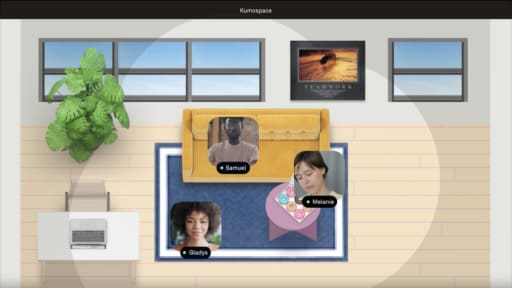
Kumospace is a virtual office platform for remote and hybrid teams. Teams can play on the video tool they already use, or run parallel games in different areas of one Kumospace office. There, spatial audio keeps each group’s guesses within that group. Test that neighboring games can’t hear each other before the first round. That setup suits larger remote teams that want everyone acting and guessing at once while still sharing one space.
Virtual charades for teams at a glance
Virtual charades is a guessing game played over a video call: one player silently acts out a private prompt on camera while everyone else guesses before the timer ends. A host-run game needs a private prompt list, a visible timer (60 seconds suits most rounds), and one guessing channel agreed before play, whether hand-raising, chat-only, or a designated caller. Each correct guess before time runs out earns one point, and prompts work best when they’re easy to act out on a small screen, like brushing your teeth, fixing the printer, or talking while on mute. Groups of 4 to 8 play well as one cooperative group, groups of 8 to 20 split into competing teams, and groups of 12 or more can also split into parallel games of 4 to 6. Hybrid games stay fair when one room camera faces the actor and in-room and remote players follow the same guessing and scoring rules.
Frequently Asked Questions
You don’t need a dedicated app. A shared document of numbered prompts, a random number picker, private chat messages, and a visible timer are enough to run online charades on any video platform. A ready-made app deck is optional, and a simple list on your phone works just as well.
Split into teams, alternate which team’s player acts, and award one point when the acting team guesses correctly before time runs out. Finish after the agreed number of rounds and tally the score to find the winning team.
Good prompts are simple to act in under a minute, inclusive, and recognizable to most colleagues: office tasks like "fixing the printer," remote work moments like "talking while on mute," popular movies, everyday actions, and animals all work well.
A group of 4 to 8 people works well as a starting size. Larger groups can split into teams or run parallel games, each with its own facilitator and private prompt list, so no one spends too long waiting for their turn.
Award one point for each correctly guessed prompt within the time limit. Keep a simple tally in a shared document, notepad, or meeting chat, and optionally give small recognition to the winning team at the end of the session.